---
title: How to Configure the Participant Store
description: Race Roster Knowledge Base
---
[Skip to content](https://hubspot.raceroster.com/en-us/knowledge-base/how-to-configure-the-participant-store#main-content)
[Contact Support](https://hubspot.raceroster.com/en-us/knowledge-base/kb-tickets/new?hsLang=en-us)
Race Roster
Open main navigation
Close main navigation
- [Contact Support](https://hubspot.raceroster.com/en-us/knowledge-base/kb-tickets/new)
How can we help you?
- There are no suggestions because the search field is empty.
1. [Race Roster Knowledge Base](https://hubspot.raceroster.com/en-us/knowledge-base?hsLang=en-us)
2. [Event Organizers and Race Directors](https://hubspot.raceroster.com/en-us/knowledge-base/event-organizers-and-race-directors?hsLang=en-us)
3. [Products](https://hubspot.raceroster.com/en-us/knowledge-base/event-organizers-and-race-directors?hsLang=en-us#products)
- [Event Organizers and Race Directors](https://hubspot.raceroster.com/en-us/knowledge-base/event-organizers-and-race-directors?hsLang=en-us#main-content)
- [Participant Management](https://hubspot.raceroster.com/en-us/knowledge-base/event-organizers-and-race-directors?hsLang=en-us#participant-management)
- [Financials](https://hubspot.raceroster.com/en-us/knowledge-base/event-organizers-and-race-directors?hsLang=en-us#financials)
- [Marketing & Promotions](https://hubspot.raceroster.com/en-us/knowledge-base/event-organizers-and-race-directors?hsLang=en-us#marketing-promotions)
- [Email Campaigns, MailChimp Integration](https://hubspot.raceroster.com/en-us/knowledge-base/event-organizers-and-race-directors?hsLang=en-us#email-campaigns-mailchimp-integration)
- [Products](https://hubspot.raceroster.com/en-us/knowledge-base/event-organizers-and-race-directors?hsLang=en-us#products)
- [Team Management and Settings](https://hubspot.raceroster.com/en-us/knowledge-base/event-organizers-and-race-directors?hsLang=en-us#team-management-and-settings)
- [Onsite App](https://hubspot.raceroster.com/en-us/knowledge-base/event-organizers-and-race-directors?hsLang=en-us#onsite-app)
- [Registration Questions](https://hubspot.raceroster.com/en-us/knowledge-base/event-organizers-and-race-directors?hsLang=en-us#registration-questions)
- [Fundraising Settings and Receipts](https://hubspot.raceroster.com/en-us/knowledge-base/event-organizers-and-race-directors?hsLang=en-us#fundraising-settings-and-receipts)
- [Promo Codes, Discounts, and Gifting Codes](https://hubspot.raceroster.com/en-us/knowledge-base/event-organizers-and-race-directors?hsLang=en-us#promo-codes-discounts-and-gifting-codes)
- [Virtual](https://hubspot.raceroster.com/en-us/knowledge-base/event-organizers-and-race-directors?hsLang=en-us#virtual)
- [Results](https://hubspot.raceroster.com/en-us/knowledge-base/event-organizers-and-race-directors?hsLang=en-us#results)
- [Access codes](https://hubspot.raceroster.com/en-us/knowledge-base/event-organizers-and-race-directors?hsLang=en-us#access-codes)
- [Director Access and Settings](https://hubspot.raceroster.com/en-us/knowledge-base/event-organizers-and-race-directors?hsLang=en-us#director-access-and-settings)
- [Pricing](https://hubspot.raceroster.com/en-us/knowledge-base/event-organizers-and-race-directors?hsLang=en-us#pricing)
- [Event Page Settings](https://hubspot.raceroster.com/en-us/knowledge-base/event-organizers-and-race-directors?hsLang=en-us#event-page-settings)
- [Your Dashboard](https://hubspot.raceroster.com/en-us/knowledge-base/event-organizers-and-race-directors?hsLang=en-us#your-dashboard)
- [Sub-events](https://hubspot.raceroster.com/en-us/knowledge-base/event-organizers-and-race-directors?hsLang=en-us#sub-events)
- [Other FAQs](https://hubspot.raceroster.com/en-us/knowledge-base/event-organizers-and-race-directors?hsLang=en-us#other-faqs)
- [Volunteers](https://hubspot.raceroster.com/en-us/knowledge-base/event-organizers-and-race-directors?hsLang=en-us#volunteers)
- [Create, Edit or Take Your Event Live](https://hubspot.raceroster.com/en-us/knowledge-base/event-organizers-and-race-directors?hsLang=en-us#create-edit-or-take-your-event-live)
- [Waivers](https://hubspot.raceroster.com/en-us/knowledge-base/event-organizers-and-race-directors?hsLang=en-us#waivers)
- [Reports](https://hubspot.raceroster.com/en-us/knowledge-base/event-organizers-and-race-directors?hsLang=en-us#reports)
- [Timers](https://hubspot.raceroster.com/en-us/knowledge-base/timers?hsLang=en-us#main-content)
- [Account settings](https://hubspot.raceroster.com/en-us/knowledge-base/timers?hsLang=en-us#account-settings)
- [Results](https://hubspot.raceroster.com/en-us/knowledge-base/timers?hsLang=en-us#results)
- [Timing Tools](https://hubspot.raceroster.com/en-us/knowledge-base/timers?hsLang=en-us#timing-tools)
- [Bib Assignment](https://hubspot.raceroster.com/en-us/knowledge-base/timers?hsLang=en-us#bib-assignment)
- [Participant Data and Reports](https://hubspot.raceroster.com/en-us/knowledge-base/timers?hsLang=en-us#participant-data-and-reports)
- [Participants and Fundraisers](https://hubspot.raceroster.com/en-us/knowledge-base/participants-and-fundraisers?hsLang=en-us#main-content)
- [Participant FAQs](https://hubspot.raceroster.com/en-us/knowledge-base/participants-and-fundraisers?hsLang=en-us#participant-faqs)
- [Fundraising](https://hubspot.raceroster.com/en-us/knowledge-base/participants-and-fundraisers?hsLang=en-us#fundraising)
- [Gift Registrations](https://hubspot.raceroster.com/en-us/knowledge-base/participants-and-fundraisers?hsLang=en-us#gift-registrations)
- [Sign In and Manage Registration](https://hubspot.raceroster.com/en-us/knowledge-base/participants-and-fundraisers?hsLang=en-us#sign-in-and-manage-registration)
- [Transfer Registration](https://hubspot.raceroster.com/en-us/knowledge-base/participants-and-fundraisers?hsLang=en-us#transfer-registration)
- [Access Codes](https://hubspot.raceroster.com/en-us/knowledge-base/participants-and-fundraisers?hsLang=en-us#access-codes)
- [Teams](https://hubspot.raceroster.com/en-us/knowledge-base/participants-and-fundraisers?hsLang=en-us#teams)
- [Security & Compliance](https://hubspot.raceroster.com/en-us/knowledge-base/participants-and-fundraisers?hsLang=en-us#security-compliance)
- [Promo Codes](https://hubspot.raceroster.com/en-us/knowledge-base/participants-and-fundraisers?hsLang=en-us#promo-codes)
- [Fundraising Coordinator](https://hubspot.raceroster.com/en-us/knowledge-base/fundraising-coordinator?hsLang=en-us#main-content)
- [Resources](https://hubspot.raceroster.com/en-us/knowledge-base/fundraising-coordinator?hsLang=en-us#resources)
- [The ASICS Runkeeper™ app](https://hubspot.raceroster.com/en-us/knowledge-base/the-asics-runkeeper-app?hsLang=en-us#main-content)
- [The ASICS Runkeeper™ app](https://hubspot.raceroster.com/en-us/knowledge-base/the-asics-runkeeper-app?hsLang=en-us#the-asics-runkeeper-app)
- [Race Roster CRM](https://hubspot.raceroster.com/en-us/knowledge-base/race-roster-crm?hsLang=en-us#main-content)
- [Organizations](https://hubspot.raceroster.com/en-us/knowledge-base/race-roster-crm?hsLang=en-us#organizations)
February 23, 2026
# How to Configure the Participant Store
The Participant Store allows registrants to purchase products that they did not purchase during registration. By default, the store is enabled upon creating a new event. This article will outline how to configure the settings for the store.
Click here to learn [how to configure product visibility and availability](https://hubspot.raceroster.com/en-us/knowledge-base/how-do-i-configure-product-visibility-and-availability-settings?hsLang=en-us) for your participant store.
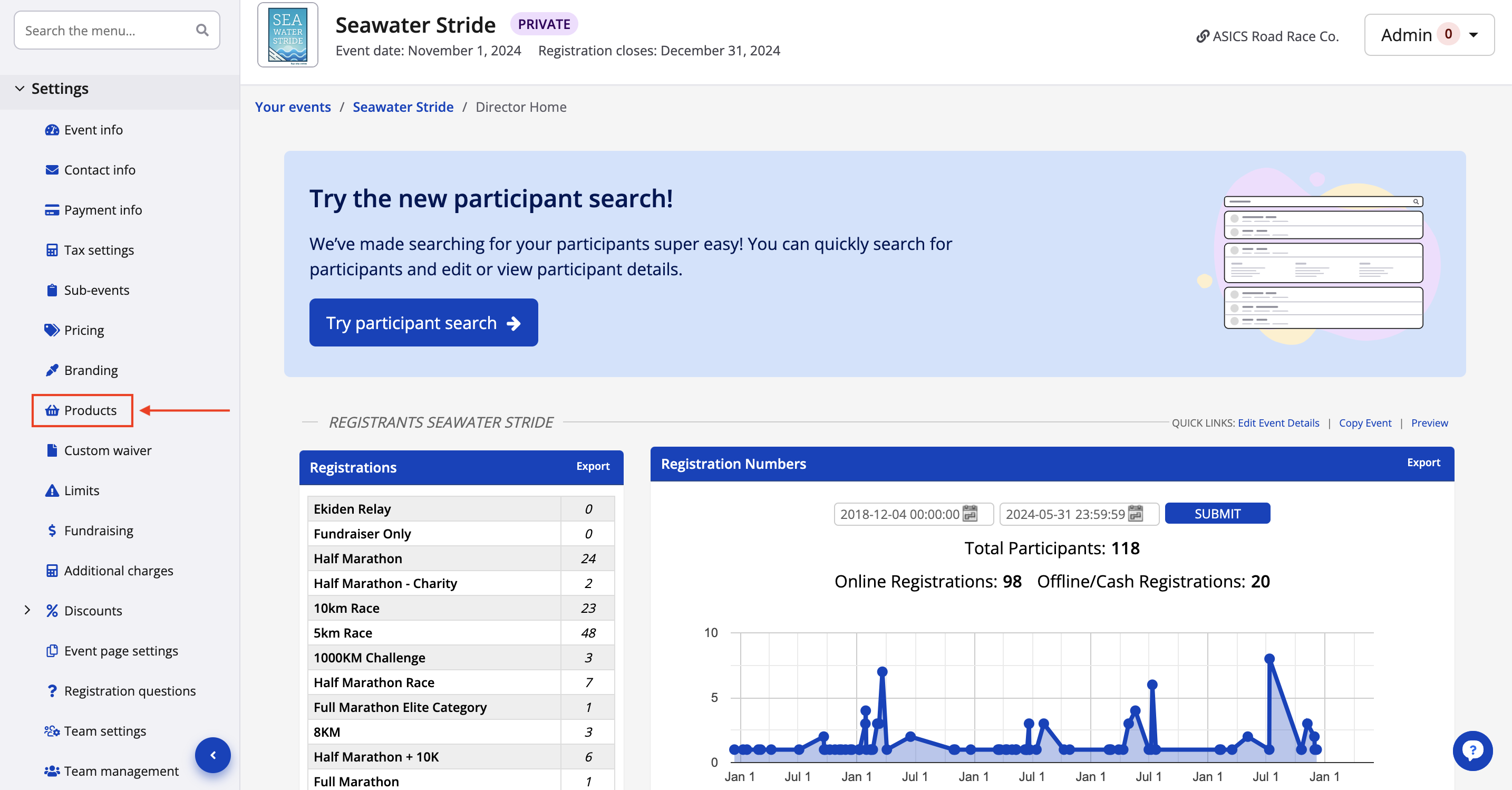
1. From your event dashboard, click on Settings -> Products from the lefthand side menu.
2. From your Product settings, click on manage store settings from the top of the page to view your store settings.
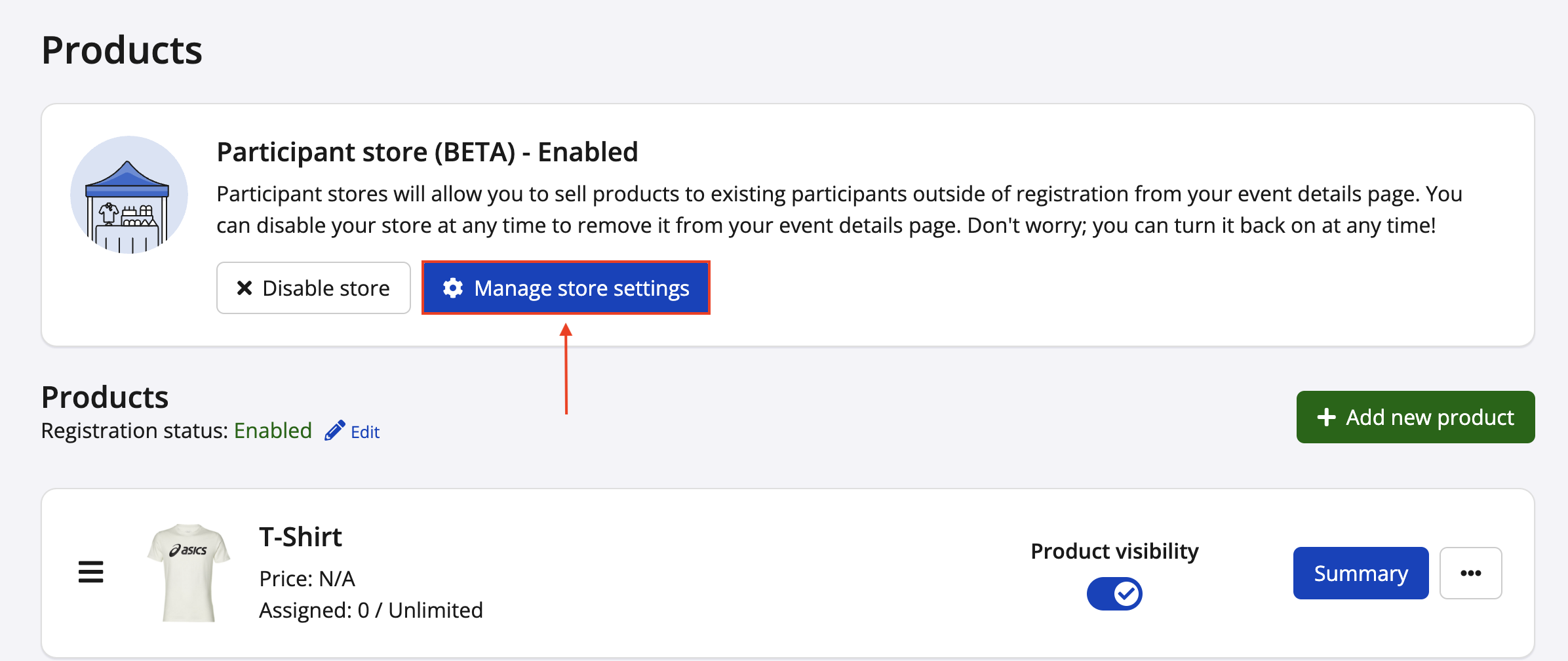
4. Once the Participant Store has been added you will be presented with two settings: **Store Settings,** and **Store Promo Codes**.
**Store Settings: **
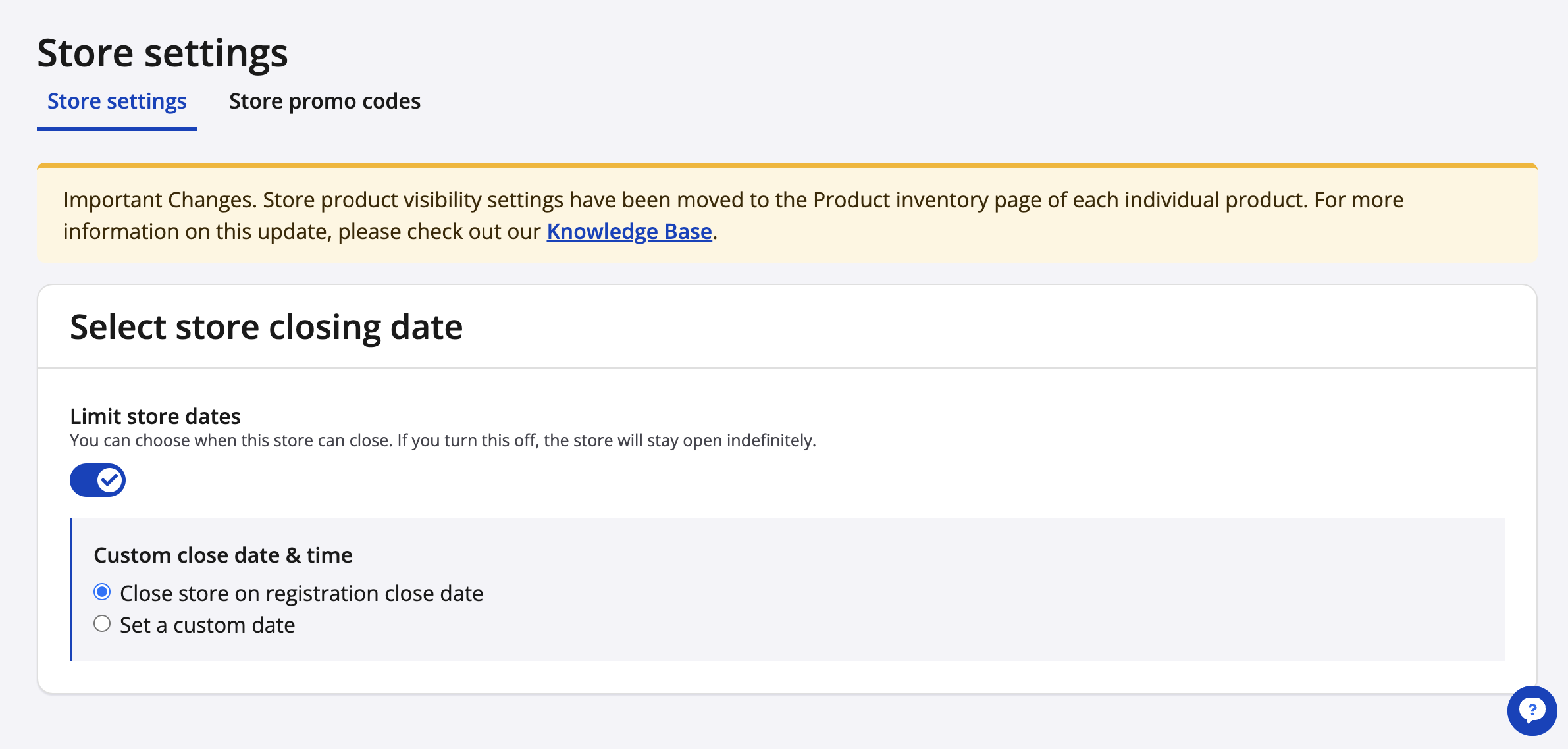
Store settings allow the user to select when their store should close to the public. Store closing dates can either be set to the registration close date as a default, or, a custom date can be selected.
**Store Promo Codes: **
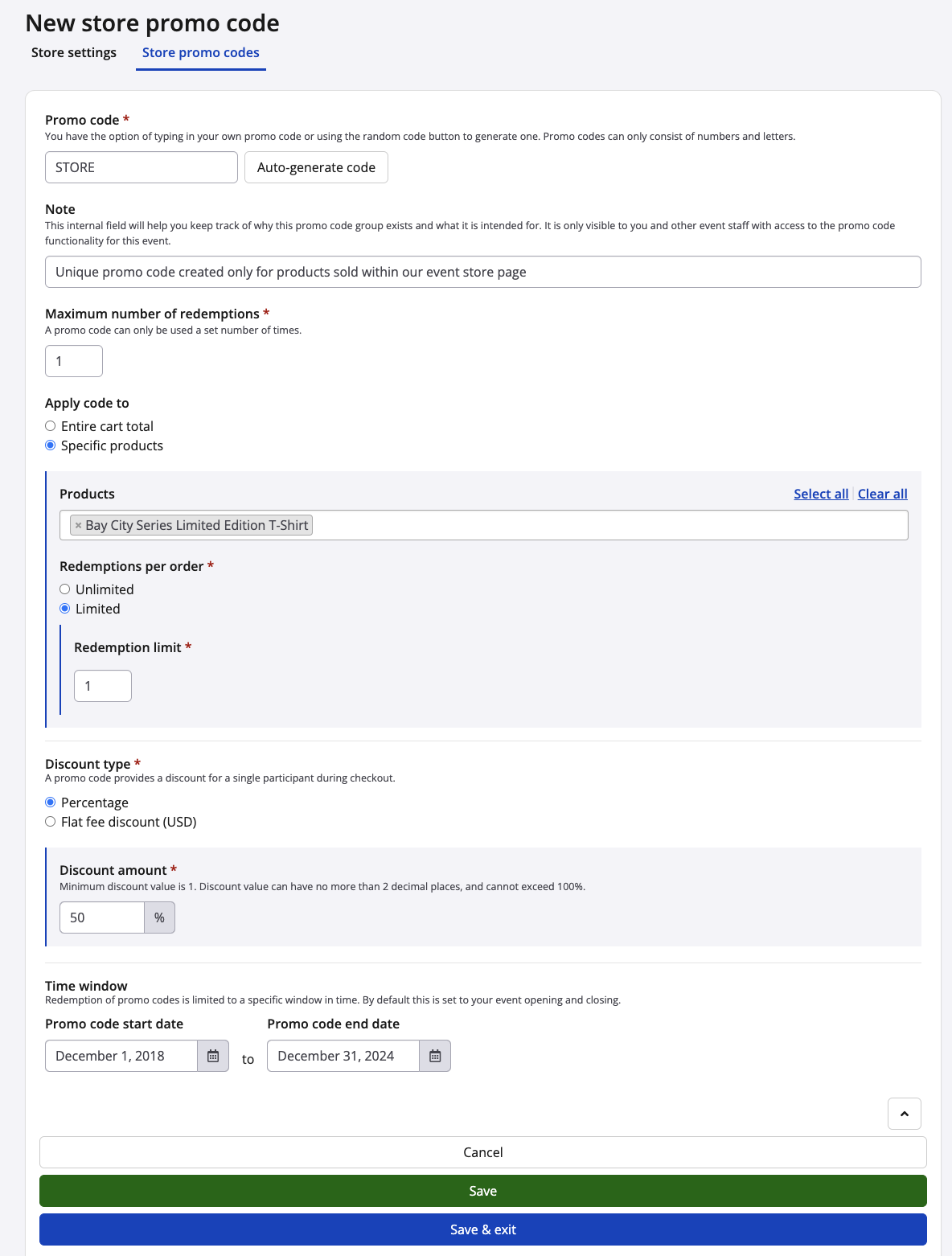
You have the ability to offer discounts by creating Promo Codes for the Participant Store. In order to create a promo code click **Create Promo Code**. You will then be prompted to create the code.
In order to create the code, you will have to fill out the following:
**Code Name: **You have the option of typing in your own promo code or using the random code button to generate one. Promo codes can only consist of numbers and letters.
**Apply code to**: You can apply the promo code to a single product or to the cart total.
**Discount type**: Select if you want the discount to be a percentage of a flat fee.
**Discount amount: **Enter the discount amount i.e. *25, 50, 100*.
**Redemption limit:** Set the number of times a code can be used.
# Race Roster
[mailto:email@email.com](mailto:email@email.com)
Copyright © 2026, Race Roster