---
title: How to Login to Your Onsite Devices
description: Race Roster Knowledge Base
---
[Skip to content](https://hubspot.raceroster.com/en-us/knowledge-base/how-to-login-to-your-onsite-devices#main-content)
[Contact Support](https://hubspot.raceroster.com/en-us/knowledge-base/kb-tickets/new?hsLang=en-us)
Race Roster
Open main navigation
Close main navigation
- [Contact Support](https://hubspot.raceroster.com/en-us/knowledge-base/kb-tickets/new)
How can we help you?
- There are no suggestions because the search field is empty.
1. [Race Roster Knowledge Base](https://hubspot.raceroster.com/en-us/knowledge-base?hsLang=en-us)
2. [Event Organizers and Race Directors](https://hubspot.raceroster.com/en-us/knowledge-base/event-organizers-and-race-directors?hsLang=en-us)
3. [Onsite App](https://hubspot.raceroster.com/en-us/knowledge-base/event-organizers-and-race-directors?hsLang=en-us#onsite-app)
- [Event Organizers and Race Directors](https://hubspot.raceroster.com/en-us/knowledge-base/event-organizers-and-race-directors?hsLang=en-us#main-content)
- [Participant Management](https://hubspot.raceroster.com/en-us/knowledge-base/event-organizers-and-race-directors?hsLang=en-us#participant-management)
- [Financials](https://hubspot.raceroster.com/en-us/knowledge-base/event-organizers-and-race-directors?hsLang=en-us#financials)
- [Marketing & Promotions](https://hubspot.raceroster.com/en-us/knowledge-base/event-organizers-and-race-directors?hsLang=en-us#marketing-promotions)
- [Email Campaigns, MailChimp Integration](https://hubspot.raceroster.com/en-us/knowledge-base/event-organizers-and-race-directors?hsLang=en-us#email-campaigns-mailchimp-integration)
- [Products](https://hubspot.raceroster.com/en-us/knowledge-base/event-organizers-and-race-directors?hsLang=en-us#products)
- [Team Management and Settings](https://hubspot.raceroster.com/en-us/knowledge-base/event-organizers-and-race-directors?hsLang=en-us#team-management-and-settings)
- [Onsite App](https://hubspot.raceroster.com/en-us/knowledge-base/event-organizers-and-race-directors?hsLang=en-us#onsite-app)
- [Registration Questions](https://hubspot.raceroster.com/en-us/knowledge-base/event-organizers-and-race-directors?hsLang=en-us#registration-questions)
- [Fundraising Settings and Receipts](https://hubspot.raceroster.com/en-us/knowledge-base/event-organizers-and-race-directors?hsLang=en-us#fundraising-settings-and-receipts)
- [Promo Codes, Discounts, and Gifting Codes](https://hubspot.raceroster.com/en-us/knowledge-base/event-organizers-and-race-directors?hsLang=en-us#promo-codes-discounts-and-gifting-codes)
- [Virtual](https://hubspot.raceroster.com/en-us/knowledge-base/event-organizers-and-race-directors?hsLang=en-us#virtual)
- [Results](https://hubspot.raceroster.com/en-us/knowledge-base/event-organizers-and-race-directors?hsLang=en-us#results)
- [Access codes](https://hubspot.raceroster.com/en-us/knowledge-base/event-organizers-and-race-directors?hsLang=en-us#access-codes)
- [Director Access and Settings](https://hubspot.raceroster.com/en-us/knowledge-base/event-organizers-and-race-directors?hsLang=en-us#director-access-and-settings)
- [Pricing](https://hubspot.raceroster.com/en-us/knowledge-base/event-organizers-and-race-directors?hsLang=en-us#pricing)
- [Event Page Settings](https://hubspot.raceroster.com/en-us/knowledge-base/event-organizers-and-race-directors?hsLang=en-us#event-page-settings)
- [Your Dashboard](https://hubspot.raceroster.com/en-us/knowledge-base/event-organizers-and-race-directors?hsLang=en-us#your-dashboard)
- [Sub-events](https://hubspot.raceroster.com/en-us/knowledge-base/event-organizers-and-race-directors?hsLang=en-us#sub-events)
- [Other FAQs](https://hubspot.raceroster.com/en-us/knowledge-base/event-organizers-and-race-directors?hsLang=en-us#other-faqs)
- [Volunteers](https://hubspot.raceroster.com/en-us/knowledge-base/event-organizers-and-race-directors?hsLang=en-us#volunteers)
- [Create, Edit or Take Your Event Live](https://hubspot.raceroster.com/en-us/knowledge-base/event-organizers-and-race-directors?hsLang=en-us#create-edit-or-take-your-event-live)
- [Waivers](https://hubspot.raceroster.com/en-us/knowledge-base/event-organizers-and-race-directors?hsLang=en-us#waivers)
- [Reports](https://hubspot.raceroster.com/en-us/knowledge-base/event-organizers-and-race-directors?hsLang=en-us#reports)
- [Timers](https://hubspot.raceroster.com/en-us/knowledge-base/timers?hsLang=en-us#main-content)
- [Account settings](https://hubspot.raceroster.com/en-us/knowledge-base/timers?hsLang=en-us#account-settings)
- [Results](https://hubspot.raceroster.com/en-us/knowledge-base/timers?hsLang=en-us#results)
- [Timing Tools](https://hubspot.raceroster.com/en-us/knowledge-base/timers?hsLang=en-us#timing-tools)
- [Bib Assignment](https://hubspot.raceroster.com/en-us/knowledge-base/timers?hsLang=en-us#bib-assignment)
- [Participant Data and Reports](https://hubspot.raceroster.com/en-us/knowledge-base/timers?hsLang=en-us#participant-data-and-reports)
- [Participants and Fundraisers](https://hubspot.raceroster.com/en-us/knowledge-base/participants-and-fundraisers?hsLang=en-us#main-content)
- [Participant FAQs](https://hubspot.raceroster.com/en-us/knowledge-base/participants-and-fundraisers?hsLang=en-us#participant-faqs)
- [Fundraising](https://hubspot.raceroster.com/en-us/knowledge-base/participants-and-fundraisers?hsLang=en-us#fundraising)
- [Gift Registrations](https://hubspot.raceroster.com/en-us/knowledge-base/participants-and-fundraisers?hsLang=en-us#gift-registrations)
- [Sign In and Manage Registration](https://hubspot.raceroster.com/en-us/knowledge-base/participants-and-fundraisers?hsLang=en-us#sign-in-and-manage-registration)
- [Transfer Registration](https://hubspot.raceroster.com/en-us/knowledge-base/participants-and-fundraisers?hsLang=en-us#transfer-registration)
- [Access Codes](https://hubspot.raceroster.com/en-us/knowledge-base/participants-and-fundraisers?hsLang=en-us#access-codes)
- [Teams](https://hubspot.raceroster.com/en-us/knowledge-base/participants-and-fundraisers?hsLang=en-us#teams)
- [Security & Compliance](https://hubspot.raceroster.com/en-us/knowledge-base/participants-and-fundraisers?hsLang=en-us#security-compliance)
- [Promo Codes](https://hubspot.raceroster.com/en-us/knowledge-base/participants-and-fundraisers?hsLang=en-us#promo-codes)
- [Fundraising Coordinator](https://hubspot.raceroster.com/en-us/knowledge-base/fundraising-coordinator?hsLang=en-us#main-content)
- [Resources](https://hubspot.raceroster.com/en-us/knowledge-base/fundraising-coordinator?hsLang=en-us#resources)
- [The ASICS Runkeeper™ app](https://hubspot.raceroster.com/en-us/knowledge-base/the-asics-runkeeper-app?hsLang=en-us#main-content)
- [The ASICS Runkeeper™ app](https://hubspot.raceroster.com/en-us/knowledge-base/the-asics-runkeeper-app?hsLang=en-us#the-asics-runkeeper-app)
- [Race Roster CRM](https://hubspot.raceroster.com/en-us/knowledge-base/race-roster-crm?hsLang=en-us#main-content)
- [Organizations](https://hubspot.raceroster.com/en-us/knowledge-base/race-roster-crm?hsLang=en-us#organizations)
February 23, 2026
# How to Login to Your Onsite Devices
Race Roster's onsite app is used to facilitate the check in process as well as any late registrations for participants during packet pickup. Every event on the Race Roster platform has its own unique onsite app portal that can be accessed from a unique link or through inputting a own unique entry token.
Please follow the steps below to learn how to login to your onsite devices.
1. From your event dashboard, click on the **apps **tab from the lefthand side menu -> **onsite app** -> **manage devices**
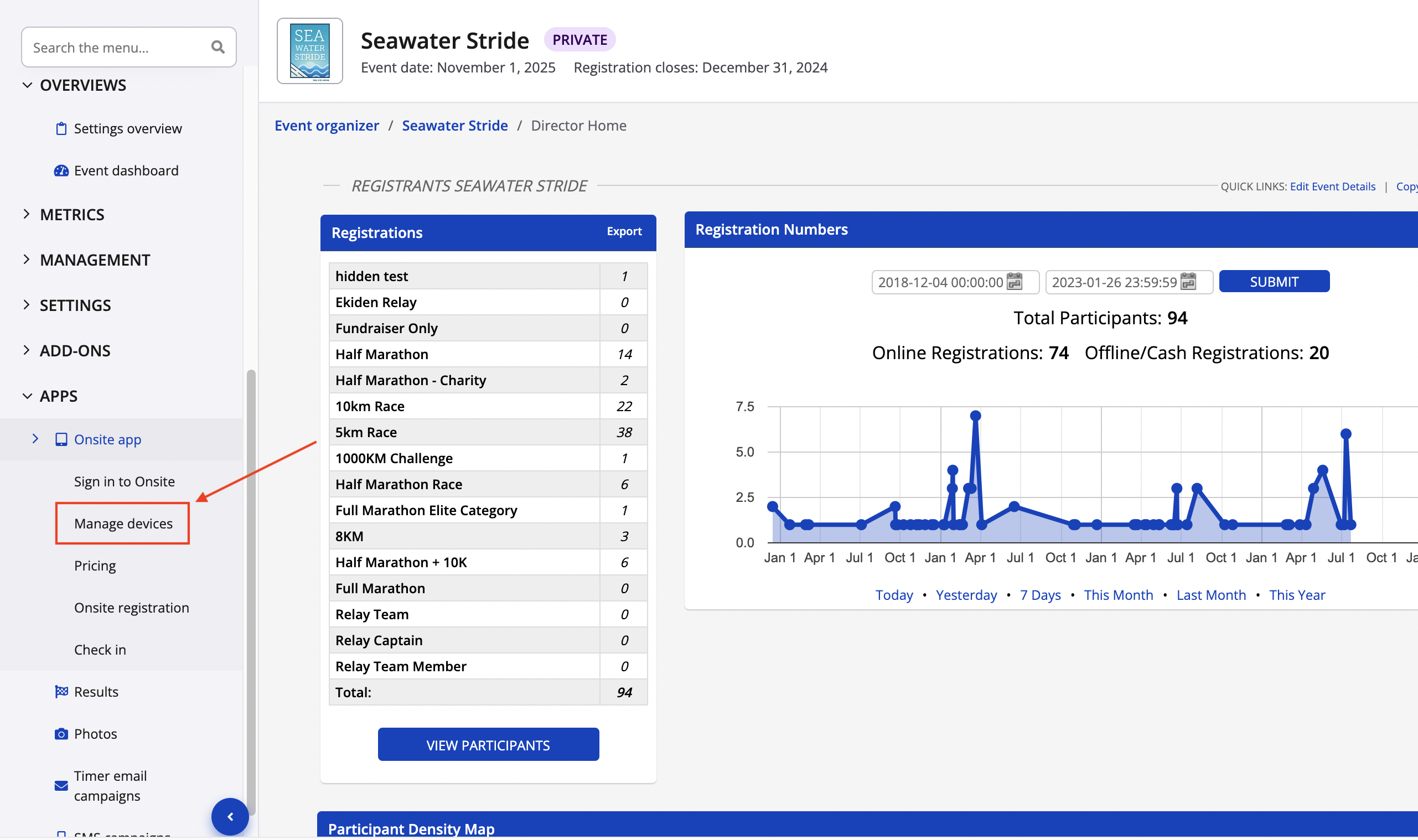
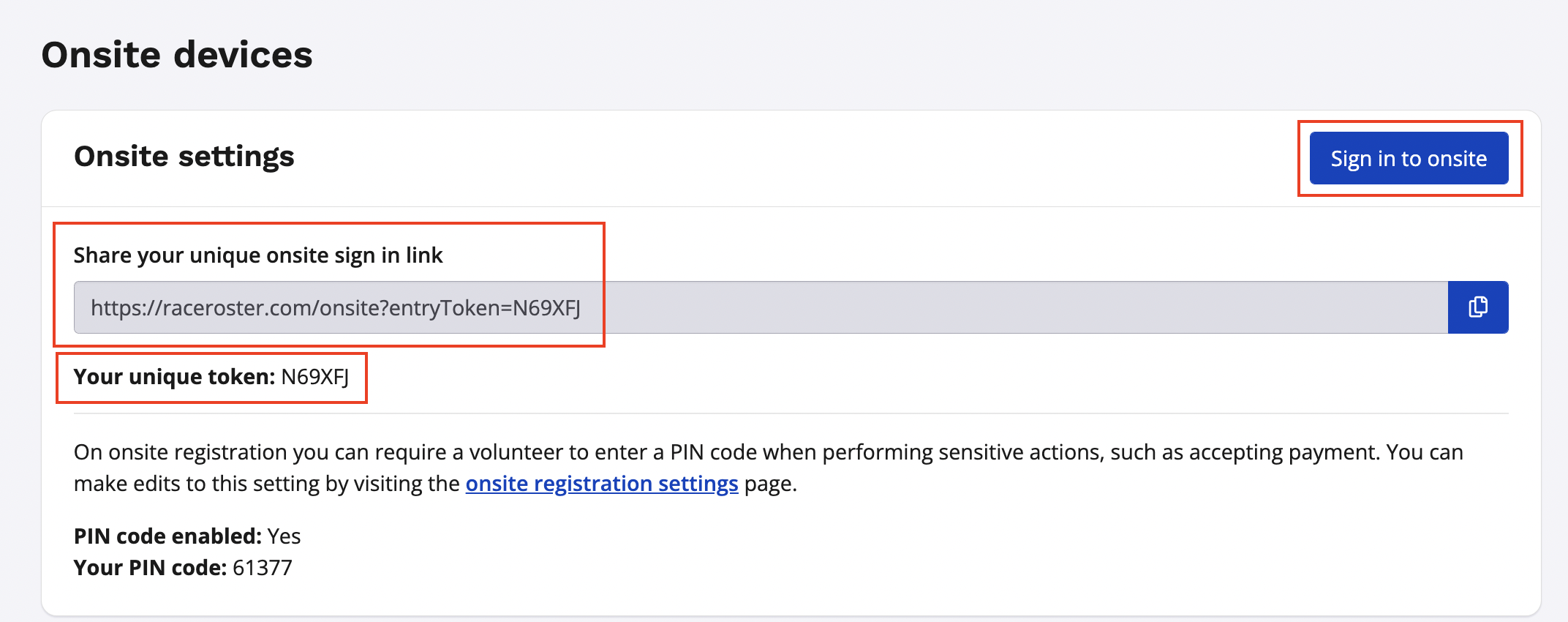
2. After setting up all of your devices (view article on how to setup onsite devices [HERE](https://hubspot.raceroster.com/en-us/knowledge-base/how-do-i-set-up-electronic-devices-for-packet-pick-up-onsite-registration-and-check-in?hsLang=en-us)), you will now be able to login to your event's onsite app. To login to the onsite app, follow either of the steps below:
- Click the blue **sign in to onsite** button in the top righthand corner of the page
- Copy the **unique onsite sign in link** displayed directly below and paste it into your browser
- Head to [https://raceroster.com/onsite/](https://raceroster.com/onsite/) and then enter in your event's unique 6 character **entry token** to login
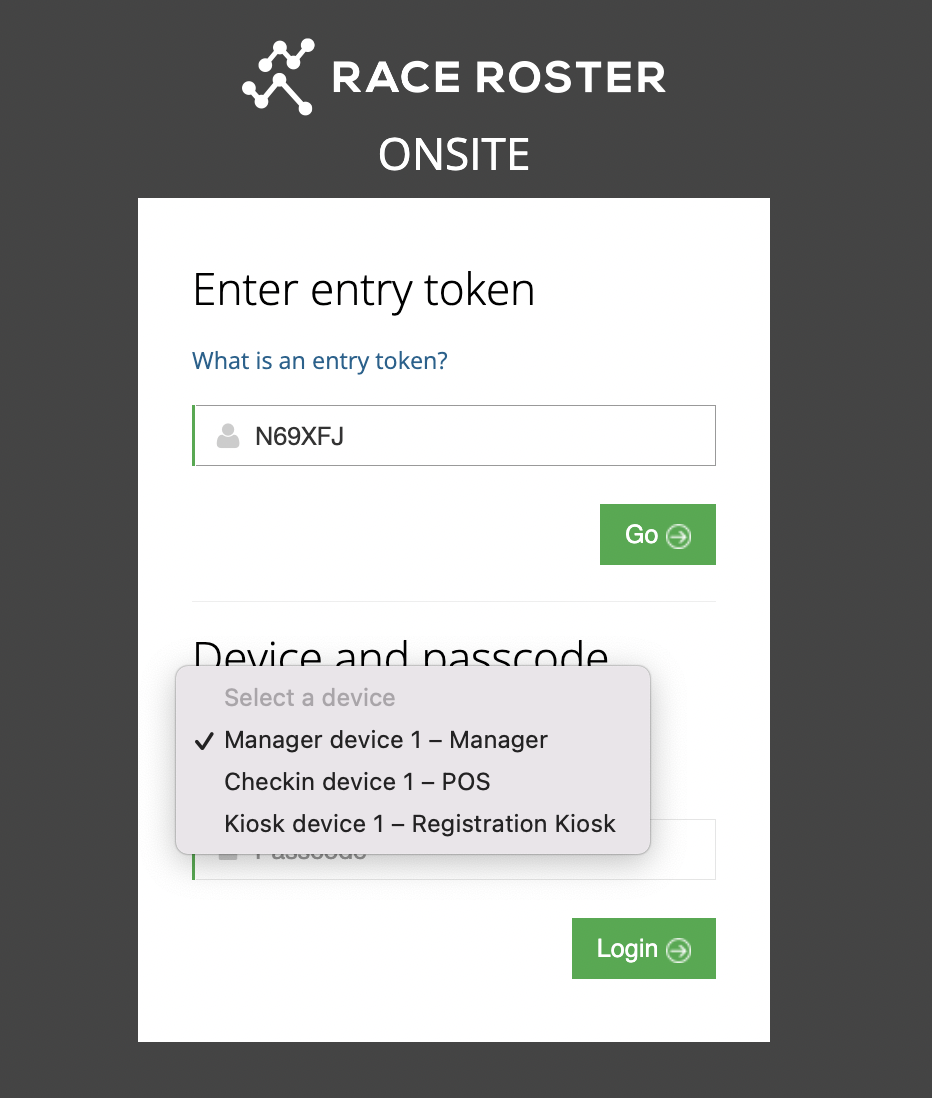
3. After logging into your event's unique onsite portal, you can now sign into the device of your choice by selecting the device from the dropdown menu of available devices, followed by entering in the device's unique passcode to complete the sign in process.
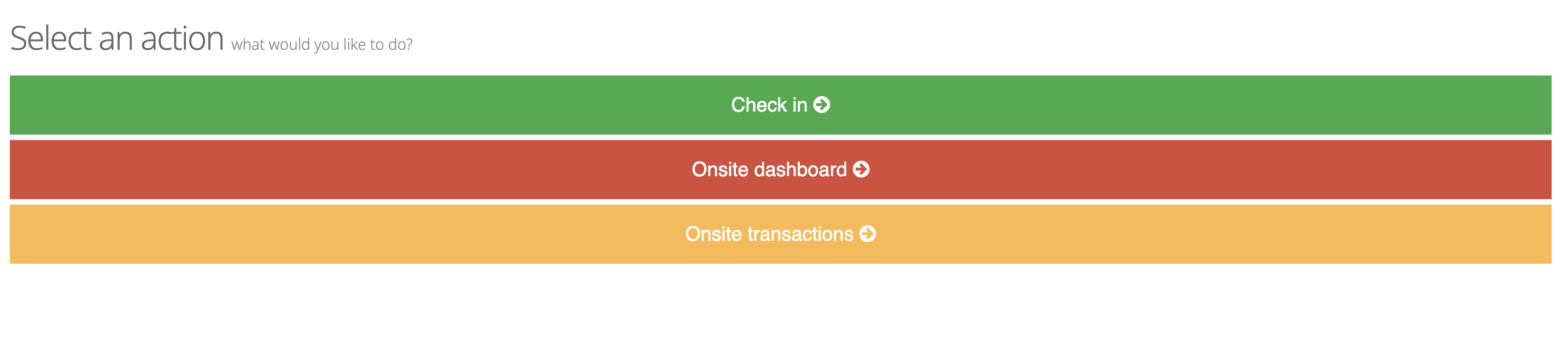
4. After signing into your onsite device, you will arrive at a different screen depending on the device type. If you are signing into a manger device, you will see the onsite menu with three options available to select.
- Check in
- Onsite dashboard
- Onsite transactions
**Please note:** The menu is only visible from manager devices, if you are signing into a registration device or a check in device, you will land directly on the kiosk or check in page with no menu displayed.
# Race Roster
[mailto:email@email.com](mailto:email@email.com)
Copyright © 2026, Race Roster