As an endurance race is in progress, logistics are key. First responder and emergency vehicles; road closure barricades and course signage; restroom, water and snack stations; announcement booths; timing equipment—the staff and volunteers responsible for these various amenities want and need to stay up to date. As head timer, their questions typically come to you:
- How far along is first place right now?
- Has everyone made it past X split?
- Is it ok to tear down equipment at and reopen X intersection?
- Did someone drop off the race?
Race Roster recognizes that processing live results is a focus-intensive job; addressing these questions one by one—or manually updating online spreadsheets with the data containing the answers—is time-consuming. So, with the event progress dashboard, the data you feed into segmented race leaderboards is automatically simplified to provide the kind of information these other teams want to know. Share the link with them and they can independently keep up with the latest, such as how many participants have progressed through a certain race split/checkpoint or whether any missed a checkpoint. This way, questions are answered by the system and you can focus on tasks of highest priority.
Sharing the link
You may locate the link to the event progress dashboard by first visiting the event-specific results dashboard. From the "Results" tab, under the "Results" heading, you will see it displayed as the second URL. Screenshot follows.
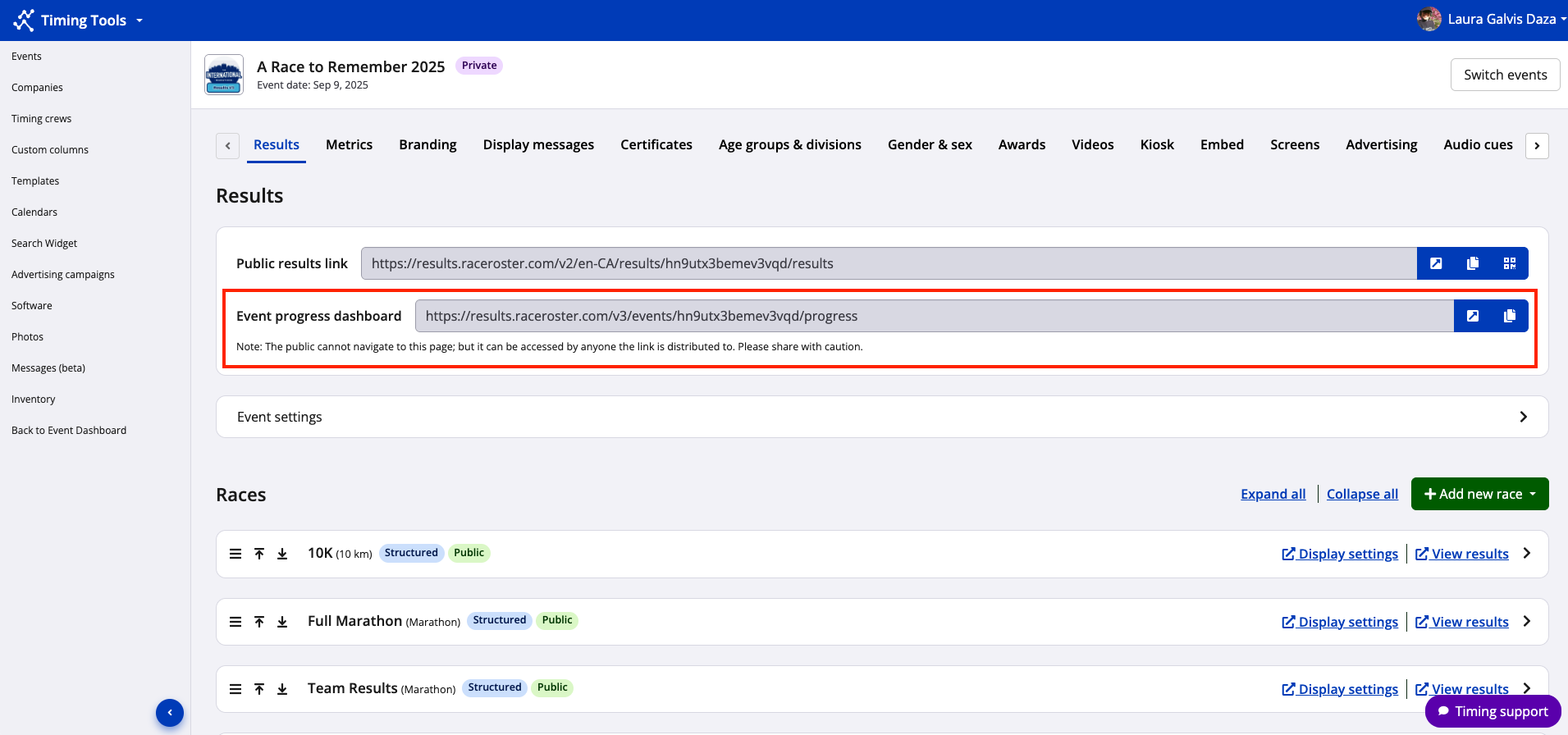
- Use the arrow icon to immediately visit the page and see how the even progress dashboard is looking, with all applicable races on display.
- Use the copy icon to copy and then paste the URL into an email, document or messaging system, and share accordingly.
The screenshot below shows a sample event progress dashboard.
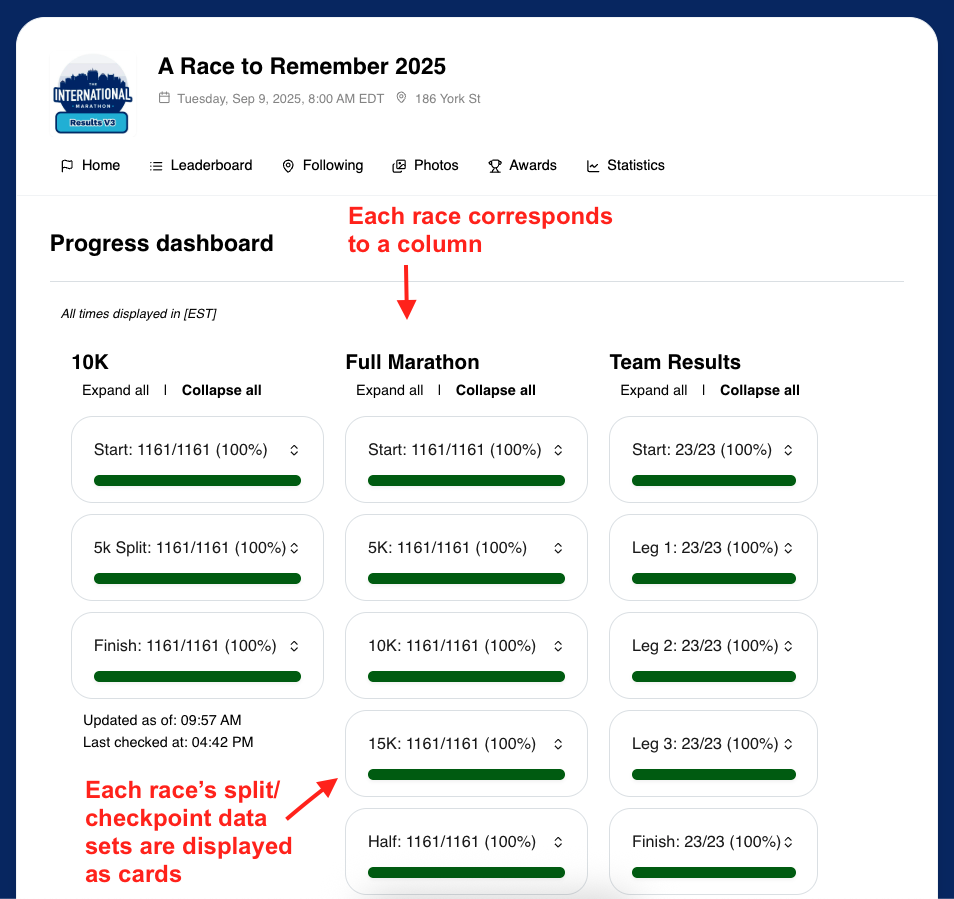
Note: We strongly recommend sharing the link to the event progress dashboard with caution. Staff and volunteers involved with event logistics are a good audience for the information contained therein. General audiences (participants, spectators) are best directed to the public results link.
Note: Until races, splits/segments, and/or data has been created, uploaded and connected, the event progress dashboard will appear mostly blank. The best time for someone to access and make use of the event progress dashboard is while races are in progress and you are actively processing results data on Race Roster.
Interpreting the data
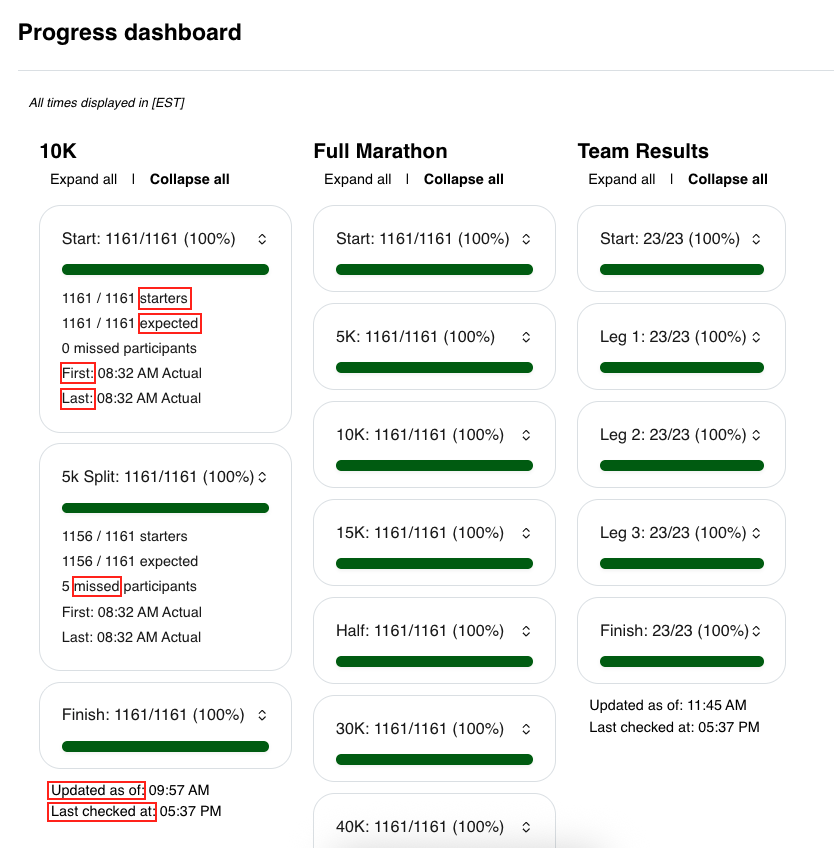
In essence, the event progress dashboard is an online location where you can direct personnel responsible for race course logistics. It was designed intuitively, with the following term definitions in effect:
Starters: Number of records with a start chip time local or start gun time local
Expected: Number of records with a time for the previous point (including start); this number will increase as those with reads at the previous point increase as well
Missed: Number of records with a read at a subsequent point should be considered a miss at all the previous point(s) where the record did not have a read; missed participants, when realized, will affect fractions for starters and expected stats as applicable
First: Predicted (if Live Predictive Tracking is enabled) or actual TOD of the first participant to cross a given point
Last: Predicted (if LPT is enabled) or actual TOD of the last participant to cross a given point
Updated as of: Timestamp for the most recent time there was a new results set processed for each race
Last checked at: Timestamp for the most recent time the system checked to see if there was a new results set upon which to base the progress statistics
Screenshot follows to display where these terms are in use within the event progress dashboard.
I'm an event staff member/volunteer/third party officer. How does the event progress dashboard help me do my job?
- You can monitor the progress of all races, from one centralized location. You can see how many participants have crossed (or missed) each race’s splits or checkpoints at any given time, expressed as a fraction of all those who have started and a fraction of those who are expected to cross each point.
- You can see the time of day when the first and final participant crosses each point. If the timer is using the Live Predictive Tracking feature on Race Roster, this is even more powerful. When paired with LPT, you’ll also see the predicted first and final participant times at the split where you have been assigned, so you can always have a good idea of when timing equipment, road closure amenities, and on-course resource stations can be shut down and retrieved or packed up, at a glance.
- There's no login required for access. While the public-at-large can’t navigate to this page on their own, the timer can send you the event progress dashboard URL at their own discretion. Maybe you are the race director, a permitting authority officer, emergency management personnel, or assigned to snack, water and restroom facilities—whatever your team, you now have a shared understanding of the status of each event race without always having to ask the timer and wait for a response.