The information you collect in your registration form is saved and tied to a unique label, called a merge tag.
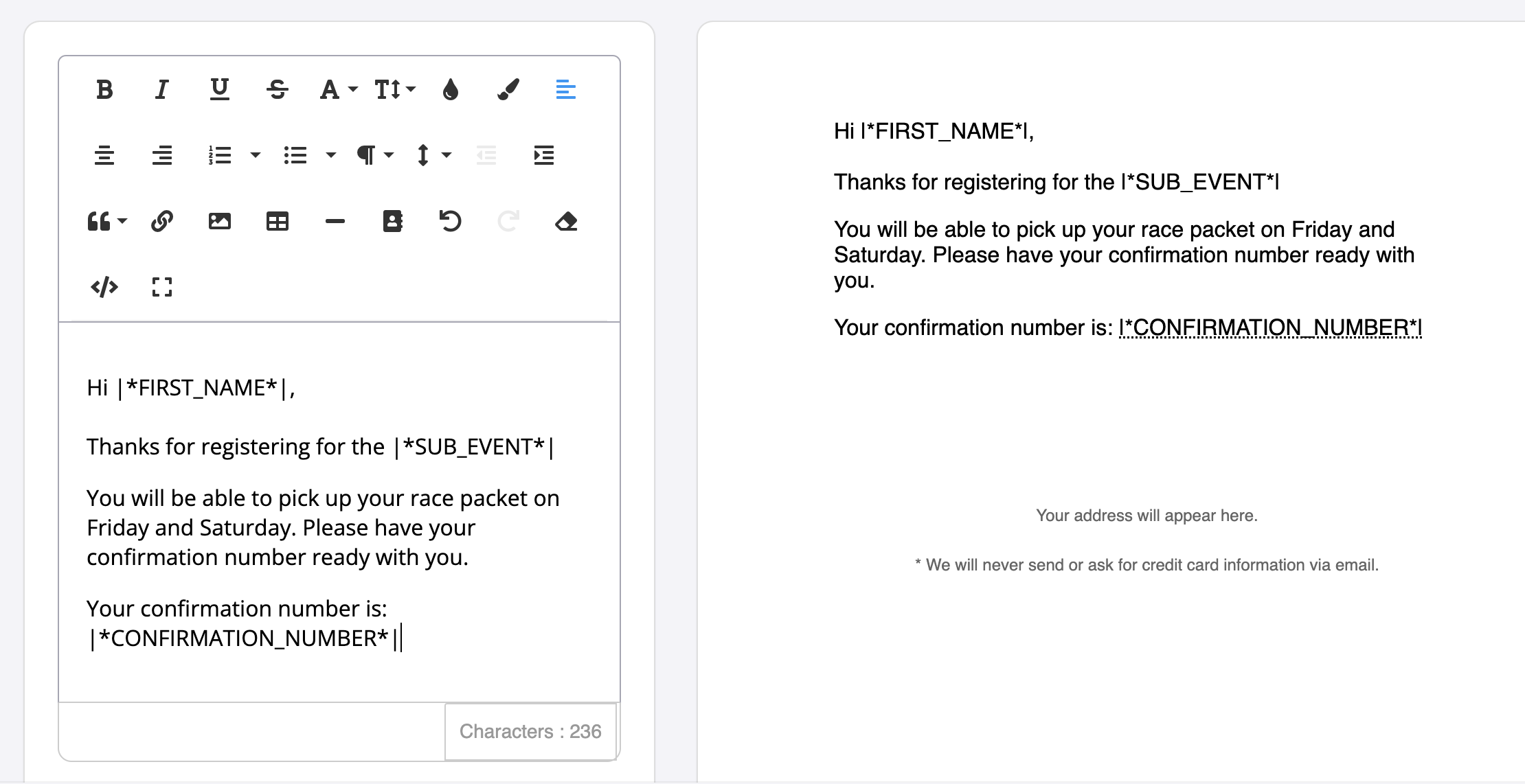
Merge tags allow you to add personalized information about your participants or volunteers to your email campaign. For e.g. First name, sub-event, their individual pledge link, etc
Merge Tag Index
Tables can't be imported directly. Please insert an image of your table which can be found here.
Tag
Information pulled
Phone
Phone number
Full name
First and Last name
First name
First name
Last Name
Last name
Date of birth
Date of Birth
Sex/Gender
Sex/Gender entered during registration
Age
Age (#)
Address
Participant or volunteer address
Address 2
Participant or volunteer address, Line 2
City
City
Region
State/Province
Postal Code
Postal Code
Country
Country
Confirmation Number
Confirmation number from the user's original transactions
Transaction date (YYYY-MM-DD hh:mm:ss)
Transaction date with specific date and times included
Transaction date (YYYY-MM-DD)
Transaction date with year/month/date formate
Transaction date (hh:mm:ss)
Transaction date with hours/minutes/seconds format
Transaction receipt URL
URL linking to a copy of the user's transaction receipt
Promoter URL
Participant or volunteers unique event promoter link (used for referral tracking)
Event Participant ID
Participant ID number found in the participant list
Event URL
Race Roster event page URL
Event name
Name of the event
Sub-event
Sub-event the participant has registered for
Distance of Sub-Event
Pulls in distance set within sub-event settings
Contact name
Contact name for the event page
Contact URL
URL that directs participants to event contact information outside of Race Roster
Contact email
Email participants can use to contact event organizers
Contact phone
Phone number participants can use to contact event organizers
Participant Dashboard URL
URL directing users to their participant dashboard
Confirmation receipt URL
URL that takes individual to the confirmation receipt
Confirmation barcode image
Populates scannable barcode found within original confirmation email
Confirmation QR code image
Populates scannable QR code found within original confirmation email
Bib number
Bib number assigned on Race Roster
Distance travelled (mi)
Estimated distance from the participant's address to the event location
Distance travelled (km)
Estimated distance from the participant's address to the event location
Registration total
Registration total displayed in a dollar amount
Registration total (numerical only)
Registration total
Claim URL
Provides a claim link for the user to claim their registration
Race Roster Account ID
Unique user ID number associated to each Race Roster account
Sub-event ID
Unique ID number associated to each sub-event on Race Roster
Fudnraising URL
Direct link to the participant or volunteers pledge page
Fundraiser earnings
Fundraising dollars earned to their individual pledge page at the time the email is sent
Fundraising goal
Goal entered on pledge page as of date email is sent
Fundraising text
Customized text entered by the individual on their pledge page
Formatted transaction fundraising amount
Fundraising Organization
Charity associated to the event
Shipping first name
First name listed under shipping information
Shipping last name
Last name listed under shipping information
Shipping phone number
Phone number listed under shipping information
Shipping address line one
Shipping address listed under shipping information
Shipping address line two
Shipping address line two listed under shipping information
Shipping city
City listed under shipping information
Shipping ZIP/postal code
ZIP/postal code listed under shipping information
Shipping country
Country listed under shipping information
Shipping state/province
State/province listed under shipping information
Assigned volunteer activity
Activity they have automatically been assigned to OR the race director have assigned them too
Requested volunteer activity
Activity they have selected in the registration form as their preferred station/activity
Team type
Type of team assigned to the team selected (i.e. Open teams, Male/Female/Mixed team, etc.)
Team name
Name of team entered
Team URL
URL to team page
Product: [NAME OF PRODUCT]
There may be various 'Swag: [NAME OF SWAG]' items available in your merge tags. One merge tag will be available for each swag item you have available.
Registration question: [QUESTION]
Answer to corresponding question
Team question: [QUESTION]
Answer to corresponding question answered during team creation or when joining a team
Completed Achievement
The name of the achievement completed by the participant
Achievement: [ACHIEVEMENT NAME]
Inserts the name of the achievement selected
Assigned code name
Name of third party code
Assigned code expiration
Expiration day/time of third party code
Assigned code value
Value of third party code
Assigned code primary code
First code uploaded in third party codes
Second code uploaded in third party codes (if applicable)
Assigned code download link
Download link participants can use to view third party code
Promo code used
Insert the code that was used during registration (if any)